

import requests
import folium
import folium.raster_layers
import rasterio
import numpy as np
from rasterio.warp import transform_bounds
from pyproj import Transformer
from PIL import Image
import base64
import io
import json
from IPython.display import clear_output, display
from authlib.integrations.requests_client import OAuth2Session
from urllib.parse import urlparse, parse_qs
import timeGeographical Service Upscaling using the APEx Dispatch API
This notebooks showcases a demo of the APEx Upscaling Service by demonstrating the capabilities of the APEx Dispatch API. In this notebook we will perform a small upscaling exercise for one of the services in the APEx Algoritm Catalogue, specfically the PV Farm Detection. We will split up an area of interest in a 20x20km grid and execute this through this upscaling task through the APEx Dispatch API.
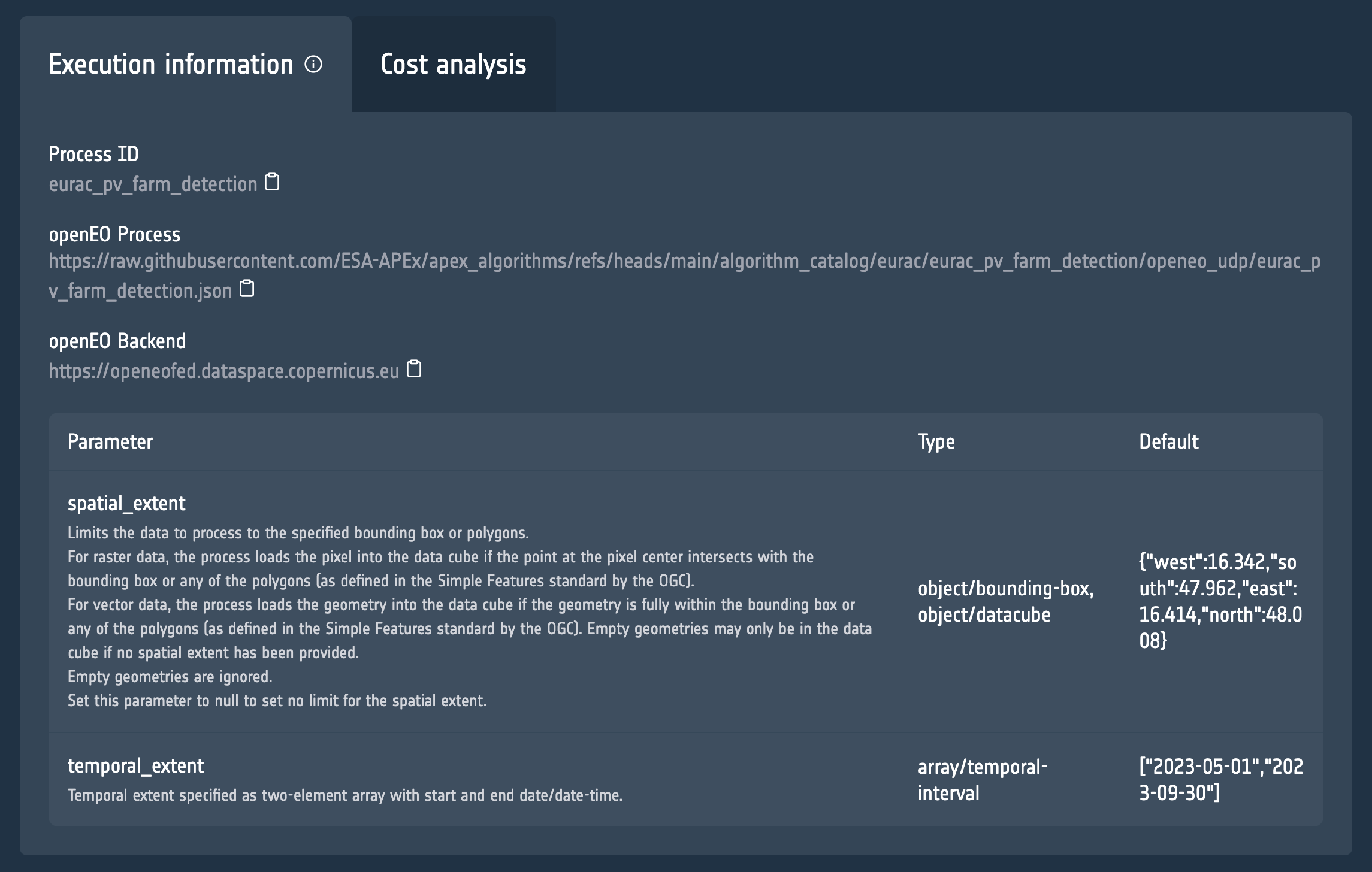
The information that we need is the link to the openEO process and openEO Backend, which you can find in the Execution Information tab on the catalogue.
Supported Services
Please access our documentation to learn which of the platforms and services are supported by the APEx Dispatch API.
Prerequisites
It is important to highlight that you will need to have access to the Copernicus Data Space Ecosytem in order to execute this notebook.
Setting up the parameters
Before diving into the code to call the APEx Dispatch API, we start by defining the parameters that we will be using for executing the PV Farm Detection service.
process_url = "https://raw.githubusercontent.com/ESA-APEx/apex_algorithms/refs/heads/main/algorithm_catalog/eurac/eurac_pv_farm_detection/openeo_udp/eurac_pv_farm_detection.json"
backend = "https://openeofed.dataspace.copernicus.eu"
spatial_extent ={
"coordinates": [
[
[
16.14820803974601,
48.3081456959695
],
[
16.14820803974601,
48.0326396134746
],
[
16.70922281740272,
48.0326396134746
],
[
16.70922281740272,
48.3081456959695
],
[
16.14820803974601,
48.3081456959695
]
]
],
"type": "Polygon"
}
temporal_extent = ["2023-05-01", "2023-09-30"]
output_format = "gtiff"Authentication with the API
To access the different endpoints of the Dispatcher API it is important to first authenticate yourself with the APEx environment.
NOTE Please ensure that your CDSE account is linked to APEx account, as described here.
KEYCLOAK_HOST = "auth.apex.esa.int"
CLIENT_ID = "apex-dispatcher-api-prod"
# Endpoints
authorization_endpoint = f"https://{KEYCLOAK_HOST}/realms/apex/protocol/openid-connect/auth"
token_endpoint = f"https://{KEYCLOAK_HOST}/realms/apex/protocol/openid-connect/token"
# Global token store
_token_data = None
def get_access_token():
"""
Returns a valid access token. Refreshes it automatically if expired.
"""
global _token_data
# If we have a token and it hasn't expired yet, return it
if _token_data and _token_data.get("expires_at", 0) > time.time() + 10:
return _token_data["access_token"]
# If token exists but is expired and has a refresh_token, refresh it
if _token_data and "refresh_token" in _token_data:
session = OAuth2Session(CLIENT_ID, token=_token_data)
_token_data = session.refresh_token(token_endpoint)
return _token_data["access_token"]
# Otherwise, start a new OAuth2 flow
session = OAuth2Session(
client_id=CLIENT_ID,
redirect_uri="http://localhost:8000/callback"
)
uri, state = session.create_authorization_url(authorization_endpoint)
print("Open this URL in your browser:", uri)
redirect_url = input("Paste the redirect URL here: ")
parsed = urlparse(redirect_url)
code = parse_qs(parsed.query).get("code")[0]
_token_data = session.fetch_token(
token_endpoint,
code=code,
client_secret=None, # only if your client is confidential
include_client_id=True
)
return _token_data["access_token"]Retrieval of the tiles
The first step in our upscaling exercise is to determine the different tiles to be processed based on the given area_of_interest. In this example we ask the dispatcher to split up the area in a 20x20km grid. This results in a list of tiles that are visualised on the map.
# Get tiles
tiles = requests.post("https://dispatch-api.apex.esa.int/tiles", json={
    "grid": "20x20km",
    "aoi": spatial_extent
}).json()
print(f"Processing {len(tiles['geometries'])} tiles for area of interest")
Processing 12 tiles for area of interest# Calculate center and zoom from spatial extent bounds
coords = spatial_extent["coordinates"][0]
lons = [c[0] for c in coords]
lats = [c[1] for c in coords]
center_lat = (min(lats) + max(lats)) / 2
center_lon = (min(lons) + max(lons)) / 2
zoom = 9
# Create a folium map centered at the area of interest
m_tiles = folium.Map(
location=[center_lat, center_lon],
zoom_start=zoom,
tiles="CartoDB positron"
)
# Add tiles as GeoJSON
folium.GeoJson(
data=tiles,
style_function=lambda x: {
"color": "#1f77b4",
"weight": 1,
"fillOpacity": 0.1
}
).add_to(m_tiles)
# Fit bounds to tiles
coords = spatial_extent["coordinates"][0]
lons = [c[0] for c in coords]
lats = [c[1] for c in coords]
bounds = [[min(lats), min(lons)], [max(lats), max(lons)]]
m_tiles.fit_bounds(bounds)
# Display the map
m_tilesMake this Notebook Trusted to load map: File -> Trust Notebook
Launching the upscaling task
Next we trigger the upscaling task on the dispatcher. We provide the details of the processing jobs that need to be executed together with a dimension. This is an important parameter as this lets the dispatcher know how to scale up. In this case we are asking the dispatcher to scale up using the spatial_extent, creating a separate job for each geometry in the values section. The dispatcher will take care of all the rest. The result is the information on the created upscaling task.
upscaling_task = requests.post(
    f"https://dispatch-api.apex.esa.int/upscale_tasks",
    headers={
        "Authorization": f"Bearer {get_access_token()}"
    },
    json={
        "title": "Upscalinge - PV Detection",
        "label": "openeo",
        "service": {
           "endpoint": backend,
           "application": process_url
        },
        "format": output_format,
        "parameters": {
            "temporal_extent": temporal_extent
        },
        "dimension": {
            "name": "spatial_extent",
            "values": tiles["geometries"]
        }
    }
).json()
upscaling_task_id = upscaling_task['id']
upscaling_task
{'id': 1,
'title': 'Upscalinge - PV Detection',
'label': 'openeo',
'status': 'created'}Setting up map visualization
The following code is needed to support the visualization of the execution status and final results on a map.
def add_cog_layer(cog_url, name=None, m=None):
    """Add a Cloud-Optimized GeoTIFF layer to the folium map."""
    with rasterio.open(cog_url) as src:
        band = src.read(1).astype(np.float32)
        bounds = transform_bounds(src.crs, "EPSG:4326", *src.bounds)

        # Normalize 0–255
        band = 255 * (band - band.min()) / (band.max() - band.min())
        band = band.astype(np.uint8)

    # Convert to PNG data URI
    buf = io.BytesIO()
    Image.fromarray(band).save(buf, format="PNG")
    data_url = "data:image/png;base64," + base64.b64encode(buf.getvalue()).decode("utf-8")

    # bounds format: (west, south, east, north)
    bbox = [[bounds[1], bounds[0]], [bounds[3], bounds[2]]]
    overlay = folium.raster_layers.ImageOverlay(
        image=data_url,
        bounds=bbox,
        name=name or "COG",
        opacity=0.8
    )
    if m:
        overlay.add_to(m)
    return overlay

def add_geojson_layer(url, name=None, m=None):
    """Add a GeoJSON layer to the folium map."""
    data = requests.get(url).json()
    if "crs" in data and "properties" in data["crs"]:
        transformer = Transformer.from_crs(
            data["crs"]["properties"]["name"],
            "EPSG:4326",
            always_xy=True
        )
        for feature in data["features"]:
            geom = feature["geometry"]
            if geom["type"] == "Polygon":
                new_coords = []
                for ring in geom["coordinates"]:
                    new_ring = [list(transformer.transform(x, y)) for x, y in ring]
                    new_coords.append(new_ring)
                geom["coordinates"] = new_coords

    geo_layer = folium.GeoJson(data=data, name=name or "GeoJSON")
    if m:
        geo_layer.add_to(m)
    return geo_layer

def plot_upscaling_status(jobs_data):
    """Create a fresh folium map with current job statuses for all tiles."""
    # Create a new map for each update
    status_map = folium.Map(
        location=[center_lat, center_lon],
        zoom_start=zoom,
        tiles="CartoDB positron"
    )

    # Add each job as a colored GeoJSON feature
    features = []
    for job in jobs_data:
        status = job.get("status", "unknown")
        color = color_map.get(status, "black")
        job_id = job["id"]
        if job["status"] == "finished" and job_id not in processed_jobs:
            processed_jobs.add(job_id)
            show_results(job_id, status_map)

        features.append({
            "type": "Feature",
            "geometry": job["parameters"]["spatial_extent"],
            "properties": {
                "status": status,
                "id": job["id"]
            }
        })

    # Create FeatureCollection and add to map
    feature_collection = {
        "type": "FeatureCollection",
        "features": features
    }

    folium.GeoJson(
        data=feature_collection,
        style_function=lambda feature: {
            "color": color_map.get(feature["properties"].get("status"), "black"),
            "fillColor": color_map.get(feature["properties"].get("status"), "black"),
            "fillOpacity": 0.3 if feature["properties"].get("status") != "finished" else 0.0,
            "weight": 2
        },
        tooltip=folium.GeoJsonTooltip(fields=["status", "id"], aliases=["Status", "Job ID"])
    ).add_to(status_map)

    # Fit bounds
    coords = spatial_extent["coordinates"][0]
    lons = [c[0] for c in coords]
    lats = [c[1] for c in coords]
    bounds = [[min(lats), min(lons)], [max(lats), max(lons)]]
    status_map.fit_bounds(bounds)

    return status_map
Retrieve status of the upscaling task
We can now write a continuous monitoring process that fetches the status of the upscaling task and showcase the results on the map.
# Color map for job statuses
color_map = {
    "created": "blue",
    "queued": "orange",
    "running": "yellow",
    "finished": "lime",
    "canceled": "gray",
    "failed": "red",
    None: "grey"
}

# Keep track of processed jobs
processed_jobs = set()

def show_results(job_id, status_map):
    """Retrieve and display job results on the map."""
    result = requests.get(
        f"https://dispatch-api.apex.esa.int/unit_jobs/{job_id}/results",
        headers={"Authorization": f"Bearer {get_access_token()}"}
    )
    response = result.json()
    if output_format.lower() == "geojson":
        result_url = response["assets"]["vectorcube.geojson"]["href"]
        add_geojson_layer(result_url, name=f"Job {job_id} Results", m=status_map)
    else:
        cog_url = response["assets"]["openEO.tif"]["href"]
        add_cog_layer(cog_url, name=f"Job {job_id} Results", m=status_map)

async def listen_for_updates():
    """Monitor upscaling task status via polling."""
    finished = False
    while not finished:
        response = requests.get(
            f"https://dispatch-api.apex.esa.int/upscale_tasks/{upscaling_task_id}",
            headers={"Authorization": f"Bearer {get_access_token()}"}
        )
        task_data = response.json()

        # Plot updated status for all jobs
        status_map = plot_upscaling_status(task_data.get("jobs", []))
        clear_output(wait=True)
        display(status_map)

        # Check if entire task is complete
        finished = task_data.get("status") in ["finished", "canceled", "failed"]
        if not finished:
            time.sleep(3)

# Run the monitoring process
await listen_for_updates()
Make this Notebook Trusted to load map: File -> Trust Notebook