

FORCE with openEO on CDSE
The integration of the FORCE processing engine into the Copernicus Data Space Ecosystem (CDSE) provides access to a subset of FORCE’s processing functionality via the openEO API on CDSE.
The integrated FORCE can be used to process on cloud infrastructure using an openEO client (Python, R or Javascript) and the openEO web-interface to create and monitor jobs. Input staging on the CDSE infrastructure and SpatioTemporal Asset Catalog (STAC) generation are handled automatically.
The integration has been performed in the context of the European Space Agency’s (ESA) Application Propagation Environments (APEx) initiative. The source code is available on Github.
FORCE
FORCE (Framework for Operational Radiometric Correction for Environmental Monitoring) is an EO processing engine developed by Prof. Dr. David Frantz (Geoinformatics - Spatial Data Science, Trier University) and the Open Source FORCE community.
FORCE includes a large number of processing features, including the generation of Analysis Ready Data (ARD) Data Cubes and higher level data analysis processes. See the FORCE ‘About’ page for a full overview of FORCE’s features. The feature overview page shows which features of FORCE are exposed via openEO on CDSE.
… an all-in-one processing engine for medium-resolution Earth Observation image archives. FORCE uses the data cube concept to mass-generate Analysis Ready Data, and enables large area + time series applications. With FORCE, you can perform all essential tasks in a typical Earth Observation Analysis workflow, i.e., going from data to information.
Details of FORCE functionality and validation are described in a number of scientific publications.
Please make sure to properly acknowledge FORCE and its authors when processing with FORCE and using the results as described in the Citation and Acknowledgements guidelines
…with openEO…
This project makes it possible to use FORCE through the Copernicus Data Space Ecosystem (CDSE) openEO Service. Using, for example, the openEO Python client to interact with the backend, FORCE can be parametrized and executed using the familiar openEO machinery.
import openeo
from openeo.rest.stac_resource import StacResource
from openeo.internal.graph_building import PGNode

connection = openeo.connect("openeo.dataspace.copernicus.eu").authenticate_oidc()

# Select a STAC item to process (collections, catalogs and item collections are also supported!)
stac_item_url = "https://stac.dataspace.copernicus.eu/v1/collections/sentinel-2-l1c/items/S2A_MSIL1C_20260419T100711_N0512_R022_T32TPQ_20260419T152521"

# Create the process graph
processing_name = "FORCE_level2"
force_l2_stac_resource = StacResource(
    graph=PGNode(
        process_id="force_level2",
        arguments={
            "stac_url": stac_item_url,
            "name": processing_name,
            "do_brdf": True,
            # other FORCE level 2 parameters
        },
    ),
    connection=connection,
)

# Run processing
l2_job = force_l2_stac_resource.create_job(title=processing_name)
l2_job.start_and_wait()

# Download results (alternatively: Continue processing without download with Time Series Analysis. Check out the guide!)
l2_results = l2_job.get_results()
l2_results.download_files("force-level2-results")
For a full example, see the guide.
With the integrated FORCE, you can
- Run the force level 2 processing system to generate Analysis Ready Data (example above)
- Run the Time Series Analysis module of the FORCE higher level processing system (hlps)
- Download data cubes in FORCE’s native datacube format
The integrated FORCE does not use the openEO data cube structure. FORCE has its own file-system-based data cube model. The openEO integration makes it possible to control FORCE through the openEO API. It does not merge the datacube models of FORCE and openEO, so other openEO processes cannot work directly on FORCE data cubes.
For an overview of the FORCE functionality made available via openEO, see the feature overview.
…on CDSE
FORCE runs on the CDSE cloud processing infrastructure using the same data archive available to other CDSE services. The integrated FORCE exclusively supports the CDSE Sentinel-2 L1C collection available via the STAC API.
Getting Started
To get started, have a look at our user guide. It explains prerequisites for executing FORCE on CDSE and leads though detailed examples for level 2 and Time Series Analysis processing.
Alternatively, there are example Jupyter notebooks available in the repository.
EO Application Package
This section contains information on implementation details
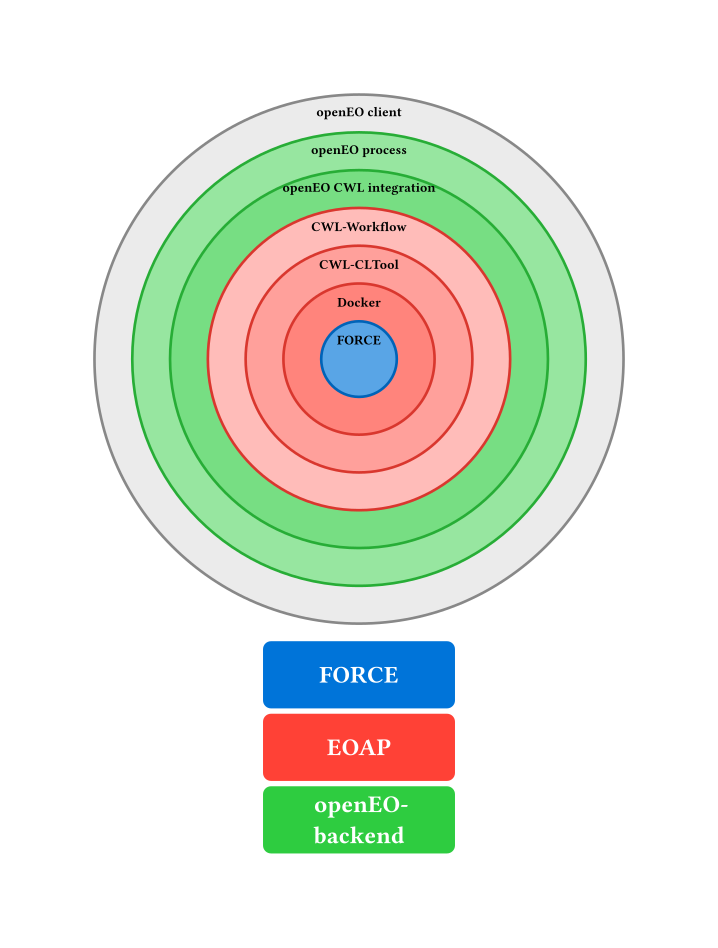
FORCE is made available through the openEO API by using the openEO backend’s support for EO Application Packages (EOAP) according to the OGC Best Practice for Earth Observation Application Package. The Common Workflow Language (CWL) documents of the EOAP for FORCE level 2 and Time Series Analysis are available in the Git repository.
More information on EOAP can be found on the Earth Observation Application Package resources website
This diagram shows the integration layers:
The integration work has been performed by Brockmann Consult GmbH